---
tags:
- code
---
# SWE Bench Verified (Compressed)
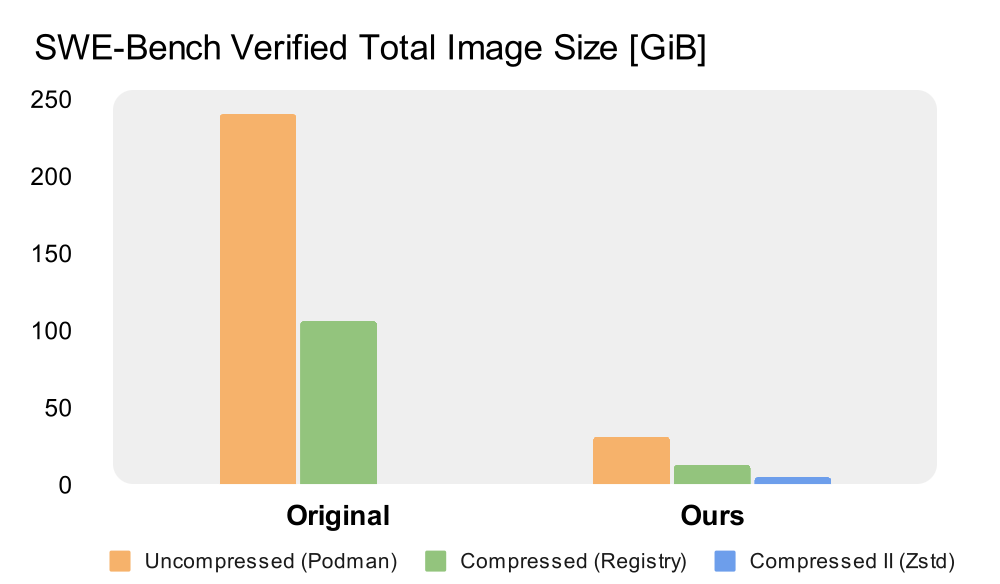 Setting up all the SWE-Bench Verified images used to take over 200 GiB of storage and 100+ GiB of transfer.
Now it’s just:
- 31 GiB total storage (down from 206 GiB)
- 5 GiB network transfer (down from 100 GiB)
- ~ 5 minutes setup
## 🚀 Getting the Images
Images follow the naming convention:
```
logicstar/sweb.eval.x86_64._1776_
```
### Docker
```bash
curl -L -# https://huggingface.co/LogicStar/SWE-Bench-Verified-Compressed/resolve/main/saved.tar.zst?download=true | zstd -d --long=31 --stdout | docker load
```
### Podman
⚠️ Podman cannot load docker-archives with manifests larger than 1 MiB.
We split the archive into two parts:
```bash
curl -L -# https://huggingface.co/LogicStar/SWE-Bench-Verified-Compressed/resolve/main/saved.1.tar.zst?download=true | zstd -d --long=31 --stdout | podman load
curl -L -# https://huggingface.co/LogicStar/SWE-Bench-Verified-Compressed/resolve/main/saved.2.tar.zst?download=true | zstd -d --long=31 --stdout | podman load
```
For faster downloads and parallelized loading, use the Hugging Face CLI to download the compressed OCI Layout and our load.py script to load the images in parallel:
```bash
# Clone the repo and cd into it
hf download LogicStar/SWE-Bench-Verified-Compressed layout.tar.zst --local-dir .
zstd -d --long=31 --stdout layout.tar.zst | tar -x -f -
python3 load.py
```
## 🛠 Using the Images
Just pass --namespace logicstar to the SWE-Bench harness. Example:
```bash
python -m swebench.harness.run_evaluation \
--predictions_path gold \
--max_workers 1 \
--run_id validate-gold \
--namespace logicstar
```
Setting up all the SWE-Bench Verified images used to take over 200 GiB of storage and 100+ GiB of transfer.
Now it’s just:
- 31 GiB total storage (down from 206 GiB)
- 5 GiB network transfer (down from 100 GiB)
- ~ 5 minutes setup
## 🚀 Getting the Images
Images follow the naming convention:
```
logicstar/sweb.eval.x86_64._1776_
```
### Docker
```bash
curl -L -# https://huggingface.co/LogicStar/SWE-Bench-Verified-Compressed/resolve/main/saved.tar.zst?download=true | zstd -d --long=31 --stdout | docker load
```
### Podman
⚠️ Podman cannot load docker-archives with manifests larger than 1 MiB.
We split the archive into two parts:
```bash
curl -L -# https://huggingface.co/LogicStar/SWE-Bench-Verified-Compressed/resolve/main/saved.1.tar.zst?download=true | zstd -d --long=31 --stdout | podman load
curl -L -# https://huggingface.co/LogicStar/SWE-Bench-Verified-Compressed/resolve/main/saved.2.tar.zst?download=true | zstd -d --long=31 --stdout | podman load
```
For faster downloads and parallelized loading, use the Hugging Face CLI to download the compressed OCI Layout and our load.py script to load the images in parallel:
```bash
# Clone the repo and cd into it
hf download LogicStar/SWE-Bench-Verified-Compressed layout.tar.zst --local-dir .
zstd -d --long=31 --stdout layout.tar.zst | tar -x -f -
python3 load.py
```
## 🛠 Using the Images
Just pass --namespace logicstar to the SWE-Bench harness. Example:
```bash
python -m swebench.harness.run_evaluation \
--predictions_path gold \
--max_workers 1 \
--run_id validate-gold \
--namespace logicstar
```